
Understanding the Article 50 Readiness Matrix
Review 19 internal readiness areas without treating the result as a compliance score or a one-to-one map of legal obligations.
Product boundary
This guide explains plugin configuration. It does not provide legal advice or certify compliance.
The matrix is an internal technical readiness tool. Its 19 rows do not correspond one-to-one to 19 legal obligations in Article 50. Some rows cover supporting operational context or separate legal and technical questions.
When to use this guide
Use this guide when you need to review the Article 50-oriented transparency information currently documented in the plugin, identify incomplete areas, and determine which items require additional configuration or qualified review.
Review the readiness matrix
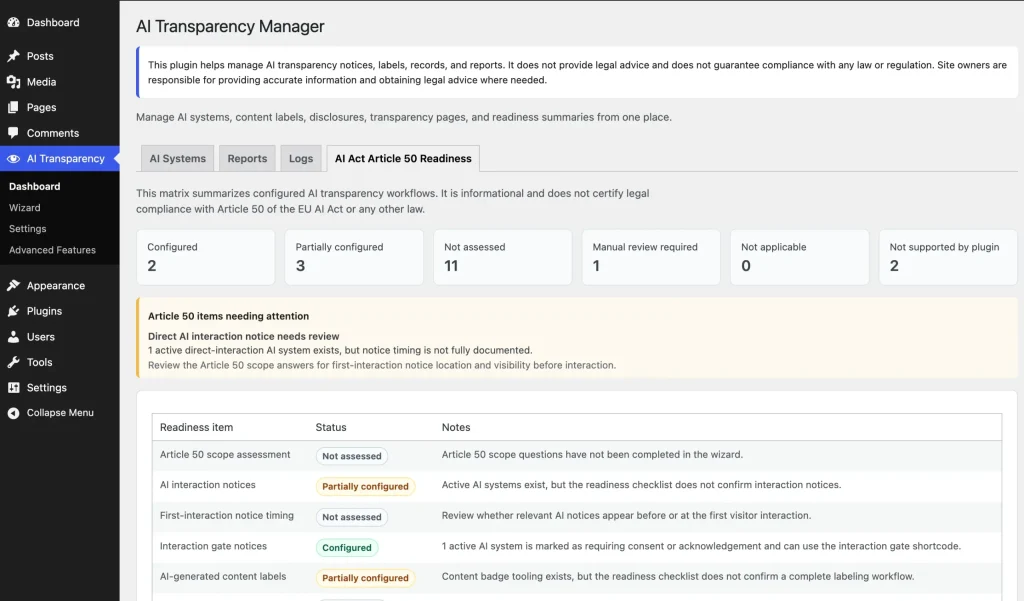
- Open AIVOW → AIVOW Dashboard → AI Act Article 50 Readiness.
- Review the summary counts at the top of the page.
- Treat the counts as a workflow overview, not as a legal compliance score.
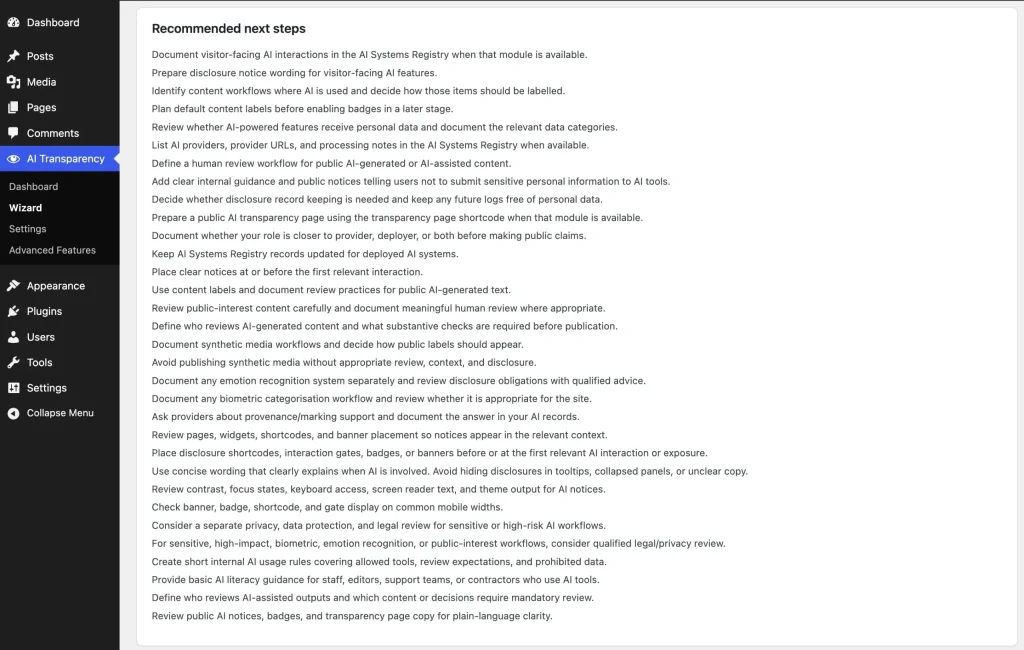
- Review each matrix row, its current status, explanation, and recommended next action.
- Investigate rows marked Partial or Not assessed.
- Complete the related Wizard answers, AI system fields, content assessments, notices, labels, or settings where appropriate.
- Return to the matrix after saving the related information and review the updated status.
- Treat Manual review required as an indication that the plugin cannot determine the answer automatically.
- Treat Not supported by plugin as a product boundary rather than a configuration error.
- Escalate legal, privacy, classification, sensitive-data, or provider-level marking questions to an appropriately qualified reviewer.
Understand the matrix statuses
The matrix uses six operational statuses:
- Configured — the plugin has found the related configuration or documented information. It does not verify that the information is accurate, complete, accessible, correctly timed, or legally sufficient.
- Partial — some related information exists, but the workflow appears incomplete.
- Not assessed — the relevant question or internal assessment has not yet been completed.
- Manual review required — the plugin cannot reliably determine the result from WordPress settings and stored records.
- Not supported by plugin — the item cannot be completed through the current plugin workflow and may require a provider-level or external process.
- Not applicable — the stored assessment indicates that the item does not apply to the documented use case.
These statuses describe the plugin’s current workflow signals. They do not determine legal applicability or prove that a legal obligation has been satisfied.
Understand what the matrix reviews
The 19 matrix rows review the following areas:
- Article 50 scope assessment;
- AI interaction notices;
- first-interaction notice timing;
- interaction gate notices;
- AI-generated content labels;
- public-interest AI text assessment;
- meaningful human review;
- content Article 50 assessments;
- public transparency page;
- disclosure records;
- lightweight AI metadata;
- provider-level machine-readable marking;
- AI Literacy readiness;
- disclosure clarity and accessibility review;
- sensitive data and qualified review;
- emotion recognition disclosure;
- biometric categorisation disclosure;
- synthetic media disclosure;
- high-risk AI classification.
These are internal readiness areas, not 19 separate Article 50 requirements. The applicable obligations depend on the organization’s role, the AI system, the generated or manipulated output, and the actual use case.
Some rows address related but separate areas. For example, AI Literacy is addressed separately under Article 4, while high-risk classification, sensitive-data processing, and data-protection questions require their own assessment.
Some rows are based on plugin configuration, while others depend on manual Wizard answers, internal content assessments, or qualified external review.
In this matrix, disclosure records refer to documented configuration and transparency information. AIVOW Lite does not collect visitor disclosure events or maintain visitor activity logs.
Review admin warnings
The matrix can show additional warnings when the stored information suggests that an important assessment may be incomplete.
A warning can appear when an Active direct-interaction AI system does not have complete first-interaction notice or timing information.
A warning can also appear when AI-labelled content or taxonomy archives still have public-interest or human-review assessment fields set to Not sure.
These warnings identify information that should be reviewed. They do not automatically mean that the site is legally non-compliant.
The following screenshots show the readiness summary, matrix rows, and recommendations for unresolved areas.
Expected result
You can identify which transparency areas are Configured, Partial, Not assessed, marked Manual review required, Not supported by plugin, or Not applicable. You also understand the next workflow action for unresolved rows without treating the matrix as legal certification.
Common mistakes
- Treating the summary counts as a legal compliance score.
- Assuming that Configured means a legal obligation has been fully satisfied.
- Expecting the plugin to determine whether Article 50 legally applies to a specific organization or use case.
- Marking an item Not applicable without reviewing the actual use of AI.
- Ignoring Manual review required rows because they cannot be completed automatically.
- Treating Not supported by plugin as a technical error.
- Expecting AIVOW Lite to provide provider-level machine-readable marking.
- Updating Wizard answers or system records without returning to review the matrix.
- Assuming the matrix automatically detects AI systems, AI-generated content, or website activity.
- Assuming that each of the 19 matrix rows represents a separate legal requirement in Article 50.
- Confusing documented disclosure information with visitor-level disclosure logging.
Troubleshooting
- Confirm that the relevant Wizard answers have been saved.
- Review the related AI system records and confirm that the required fields are complete.
- For direct-interaction warnings, review the first-interaction notice and timing information for the related Active AI system.
- For content assessment warnings, review the public-interest and meaningful human-review fields on the affected content item or taxonomy term.
- Reload the readiness page after saving related records or assessments.
- Read the explanation and recommendation shown for a row that remains Partial or Not assessed.
- Confirm that you updated the record or content item referenced by the unresolved workflow.
- Remember that Manual review required and Not supported by plugin may remain visible after all available plugin settings are completed.
- Use qualified legal, privacy, or technical review when the matrix cannot determine the appropriate answer.