
Using the AI Literacy Checklist
Record operational awareness, AI limitations, human review responsibilities, and escalation processes.
Product boundary
This guide explains plugin configuration. It does not provide legal advice or certify compliance.
The checklist covers four selected operational areas. It is not a complete Article 4 assessment and does not determine what level of AI literacy is sufficient for a particular organization, role, AI system, or use context.
When to use this guide
Use this guide when you need to document whether the people responsible for using or reviewing AI understand the relevant systems, their limitations, human review responsibilities, and the process for escalating AI-related issues.
Complete the AI Literacy checklist
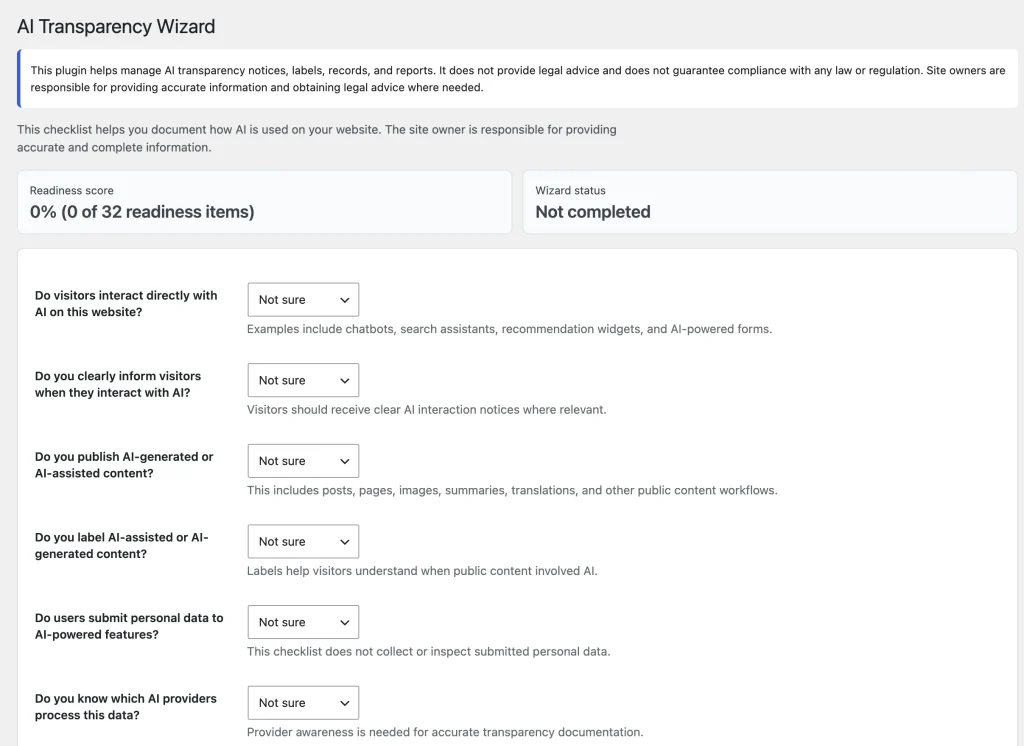
- Open AIVOW → AIVOW Wizard.
- Find the AI Literacy section.
- Review each checklist question against the site’s actual operational practices.
- Choose Yes, No, Not sure, or Not applicable for each question.
- Confirm whether relevant staff or responsible persons understand where AI is used.
- Confirm whether they understand that AI systems can produce errors, incomplete information, or misleading output.
- Confirm whether responsibility for human review has been assigned where needed.
- Confirm whether there is a known contact or escalation process for AI-related issues.
- Save the Wizard answers.
- Review any updated readiness summary and recommendations.
- Revisit the checklist when AI systems, staff responsibilities, or internal processes change.
Answer according to current documented practices. Select Not sure when the answer has not been confirmed rather than using Yes as an assumed default.
Understand what the checklist reviews
The checklist focuses on four operational areas:
- awareness of where and how AI is used;
- awareness of AI limitations, errors, and unreliable output;
- responsibility for human review or oversight;
- a contact or escalation process for AI-related concerns.
The checklist records administrator-provided answers. AIVOW Lite does not test staff knowledge, monitor training, or verify that an internal process is followed.
These four areas provide a starting point for internal documentation. They do not cover every factor that may be relevant to AI literacy measures.
AI Literacy boundary
The AI Literacy checklist is an operational documentation aid. It is not formal legal or professional training, a training certificate, an employee assessment, or proof that an organization has satisfied a legal obligation.
Article 4 refers to measures for staff and other persons dealing with the operation and use of AI systems on behalf of a provider or deployer. Relevant considerations may include their technical knowledge, experience, education and training, the context in which the AI systems are used, and the persons or groups affected.
AIVOW Lite does not determine whether an organization is a provider or deployer, identify all persons who require AI literacy measures, recommend a sufficient training program, or verify that the measures taken are appropriate for a particular context.
Choose where the AI Literacy summary appears
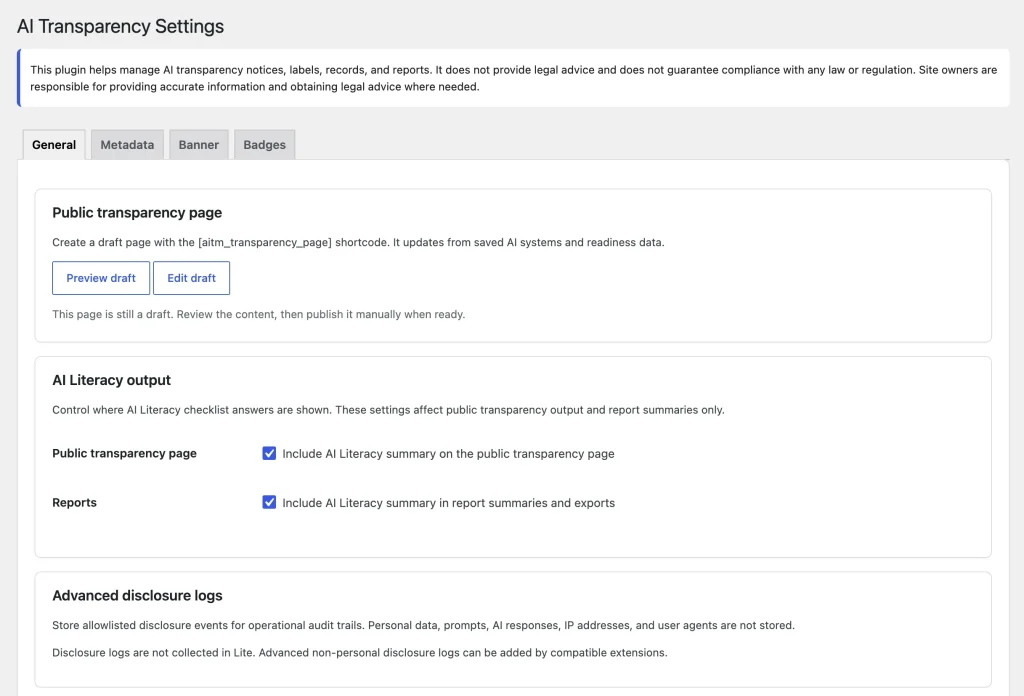
Open AIVOW → AIVOW Settings → General after completing the checklist.
- Enable Include AI Literacy summary on the public transparency page when the summary should appear in the generated public output.
- Enable Include AI Literacy summary in report summaries and exports when it should appear in supported reporting output.
- Save the settings.
- Preview the published transparency page and review the AIVOW Lite Reports tab where applicable.
In AIVOW Lite, the second setting controls the AI Literacy row in the read-only Reports summary. AIVOW Lite does not generate downloadable report files.
Disabling either setting hides the summary from that output. It does not delete the stored Wizard answers.
The following screenshots show the AI Literacy questions in the Wizard and the settings that control where the summary appears.
Expected result
The AI Literacy checklist records the current operational answers for staff awareness, AI limitations, human review responsibilities, and escalation processes. The readiness workflow reflects those answers, and the summary appears only in the outputs enabled under General settings.
A completed checklist records the administrator’s answers but does not establish that the organization has achieved a legally sufficient level of AI literacy.
Common mistakes
- Treating the checklist as formal AI literacy training.
- Selecting Yes without confirming the actual practice.
- Treating Not sure as an error instead of an unresolved question.
- Marking a question Not applicable without reviewing the organization’s actual AI use.
- Assuming the plugin tests staff knowledge or verifies internal procedures.
- Completing the checklist once and not reviewing it after responsibilities or AI systems change.
- Enabling the public summary without reviewing what will be shown to visitors.
- Expecting the Reports setting to create downloadable files in AIVOW Lite.
- Assuming that hiding the summary deletes the stored Wizard answers.
- Treating completed checklist answers as legal certification.
- Assuming that the four checklist areas constitute a complete Article 4 assessment.
- Applying the same AI literacy measures to every role, AI system, and use context without further review.
Troubleshooting
- Confirm that all AI Literacy questions in AIVOW → AIVOW Wizard have saved answers.
- Reload the Wizard after saving to confirm that the selected values remain visible.
- Use Not sure when an operational practice has not yet been confirmed.
- Review the readiness recommendations if the AI Literacy row remains incomplete.
- Open AIVOW → AIVOW Settings → General if the summary is missing from the transparency page or Reports tab.
- Confirm that the appropriate AI Literacy inclusion setting is enabled.
- Confirm that the transparency page still contains the
[aivow_transparency_page]shortcode. - Clear any active page, CDN, or optimization caches if the public transparency page still shows an older summary.
- Remember that the Reports tab is read-only in AIVOW Lite and does not provide downloadable exports.
- Use internal management, legal, HR, security, or training review when the checklist reveals an unresolved organizational issue.