
Creating and Reviewing the Transparency Page
Create a draft page from current records and publish it only after review.
Product boundary
This guide explains plugin configuration. It does not provide legal advice or certify compliance.
The generated page is a technical starting point based on saved plugin records. It is not automatically a complete or legally sufficient transparency notice.
When to use this guide
Use this guide when you are ready to create a public page that summarizes your documented AI systems, readiness information, and optional AI Literacy summary.
Create and review the transparency page
- Review all Active AI system records that should be available to public output.
- Review your current Wizard answers and readiness information.
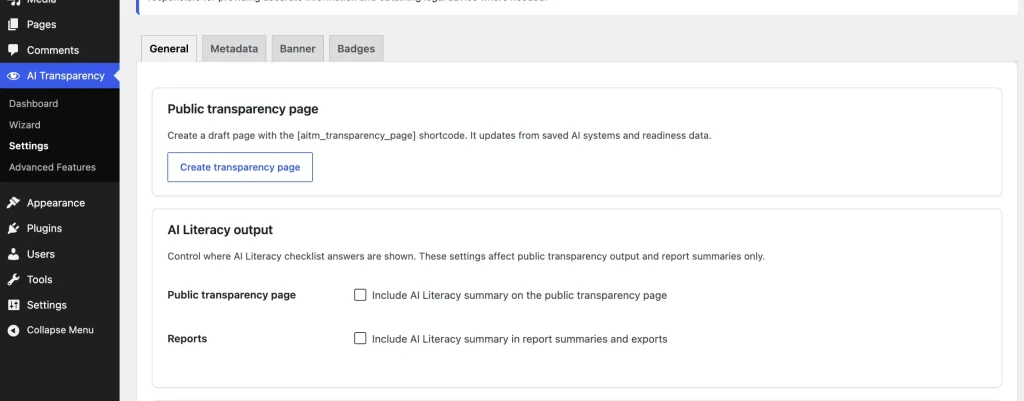
- Open AIVOW → AIVOW Settings → General.
- Decide whether the AI Literacy summary should be included on the public transparency page.
- Use the transparency page creation action.
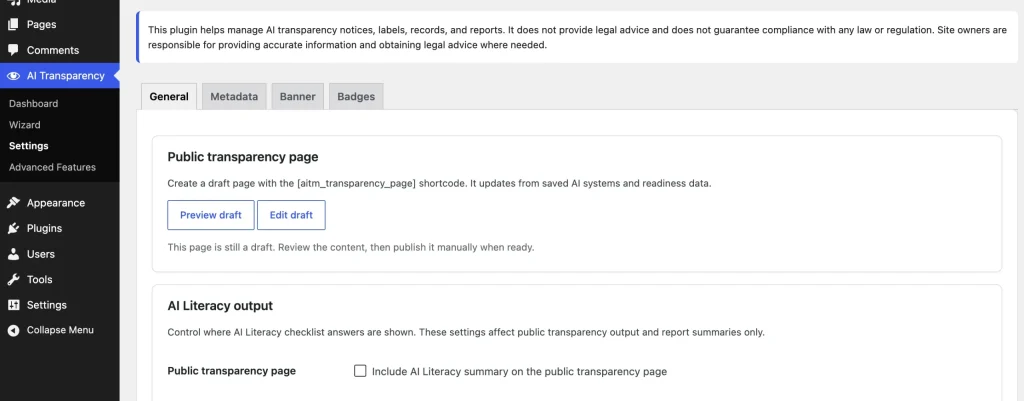
- After the success notice appears, open the newly created draft page.
- Confirm that the page contains the
[aivow_transparency_page]shortcode. - Preview the page and review the AI systems summary, readiness summary, optional AI Literacy summary, and disclaimer.
- Add a site-specific introduction above the shortcode if additional context is needed.
- Do not remove or replace the shortcode unless you intend to remove the generated transparency output.
- Publish the page only after reviewing the complete frontend output.
- Add the published page to the site footer, navigation, privacy resources, or another appropriate public location.
- Keep the AI system records, settings, and Wizard answers current after publication.
[aivow_transparency_page]The generator creates a standard WordPress page in Draft status. It does not publish the page automatically.
The shortcode output is dynamic. Changes made later to relevant AI system records, settings, or Wizard answers are reflected in the transparency page output without recreating the page.
Because the output is dynamic, saving changes to relevant plugin records or settings may change an already published Transparency Page without requiring the WordPress page to be republished. Review the public page after making significant changes. Cached pages may continue to show older information temporarily.
Understand what the page contains
The generated transparency page can include:
- an AI systems summary;
- a readiness summary;
- an optional AI Literacy summary;
- a conservative product and legal disclaimer.
The AI Literacy section appears only when its public transparency page setting is enabled. The page provides a public transparency summary; it is not a legal compliance certificate or substitute for reviewing the accuracy of your disclosures.
The AI systems section displays Active systems. Draft and Inactive records remain available in the WordPress admin but are not included in public output. AIVOW Lite does not impose a quantity limit on Active systems or public outputs.
Customize the WordPress page safely
You can change the page title, permalink, featured image, template, and surrounding WordPress content.
Add site-specific introductory text above the shortcode when visitors need more context about your organization, website, or use of AI.
Avoid replacing the generated shortcode output with copied static text. Keeping the shortcode allows the page to reflect later updates to the plugin records and settings.
The generated page remains standard WordPress content. Deactivating or deleting AIVOW Lite does not automatically move that page to Draft or delete it. If the plugin is no longer active or the transparency page is no longer required, review, unpublish, or delete the WordPress page separately.
The following screenshots show the transparency page creation action and the generated WordPress draft.
Expected result
After manual review and publication, a standard WordPress page displays the dynamic AI transparency summary through the [aivow_transparency_page] shortcode. The page can be linked from the site footer or navigation. Relevant saved changes to Active AI systems, readiness information, settings, and the optional AI Literacy summary can affect the published output.
Common mistakes
- Publishing the generated draft without reviewing the frontend output.
- Removing the
[aivow_transparency_page]shortcode from the generated page. - Replacing the dynamic output with copied static text.
- Publishing the transparency page while its AI system records are incomplete or inaccurate.
- Expecting the page to update information that has not been saved in the plugin.
- Expecting Draft or Inactive systems to appear in the public AI systems summary.
- Updating plugin records without reviewing the resulting changes on the already published Transparency Page.
- Leaving the generated page published after deactivating or deleting the plugin.
- Assuming the generated page certifies legal compliance.
- Forgetting to enable the AI Literacy public summary when that section is intended to appear.
- Creating the page but not linking it from any public location.
- Editing the page title or introduction but forgetting to update or publish the changes.
Troubleshooting
- Confirm that the generated page still contains the
[aivow_transparency_page]shortcode. - Confirm that the page is Published rather than Draft or Private when testing it as a visitor.
- Preview the page on the frontend rather than relying only on the block editor.
- Confirm that relevant AI system records and Wizard answers have been saved.
- Review AIVOW → AIVOW Settings → General if the AI Literacy summary is missing.
- Confirm that your theme processes WordPress page content and shortcodes normally.
- Temporarily test the shortcode on a simple page if the generated page uses a complex custom template.
- Clear any active page, CDN, or optimization caches if recently updated information does not appear.
- If the page output is incomplete, check whether the relevant plugin records contain enough public information.
- If the shortcode appears as plain text, make sure it is placed in a WordPress Shortcode block rather than a Code block on the public page.
- If an AI system is missing from the public summary, confirm that its status is Active. Draft and Inactive systems are not included in public output.